Handball video analysis software
Tag every action. Find any clip in seconds.
Video analysis for handball coaches: a tag panel built for defense systems, shots, 7vs6 and suspensions. Tag the match as you watch it, build scouting reports and send video to your players.
30-day free trial · Windows, macOS and Linux · 8 languages
Screenshots from the REVOS app, with sample team and player data.
A tag panel built for handball
The REVOS handball panel covers the categories coaches use every week: defense systems, shot type and distance, 7vs6, empty goal, phases of play, positions, fouls and suspensions. Everything is organized in columns and colors, ready to click while the video plays.
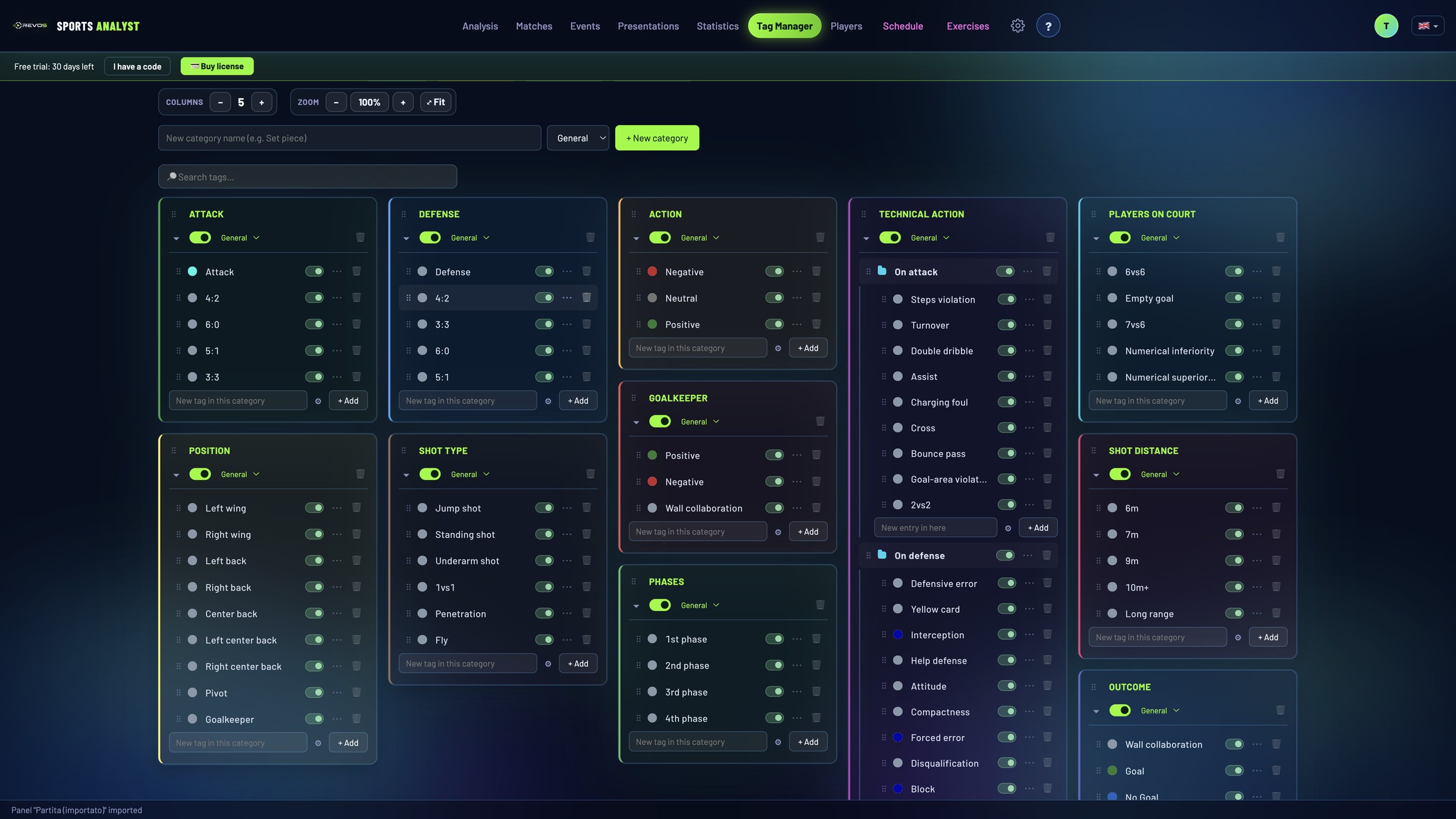
What you see here is the default panel that comes with REVOS: the panel is fully customizable, so you can adapt it to your own way of analyzing. It is your panel, not ours. Rename, reorder, recolor, add or merge tags, create several panels (for example one for matches and one for training) and export them to share with your staff. Tags are available in 8 languages.
Every tagged action is a clip you can find
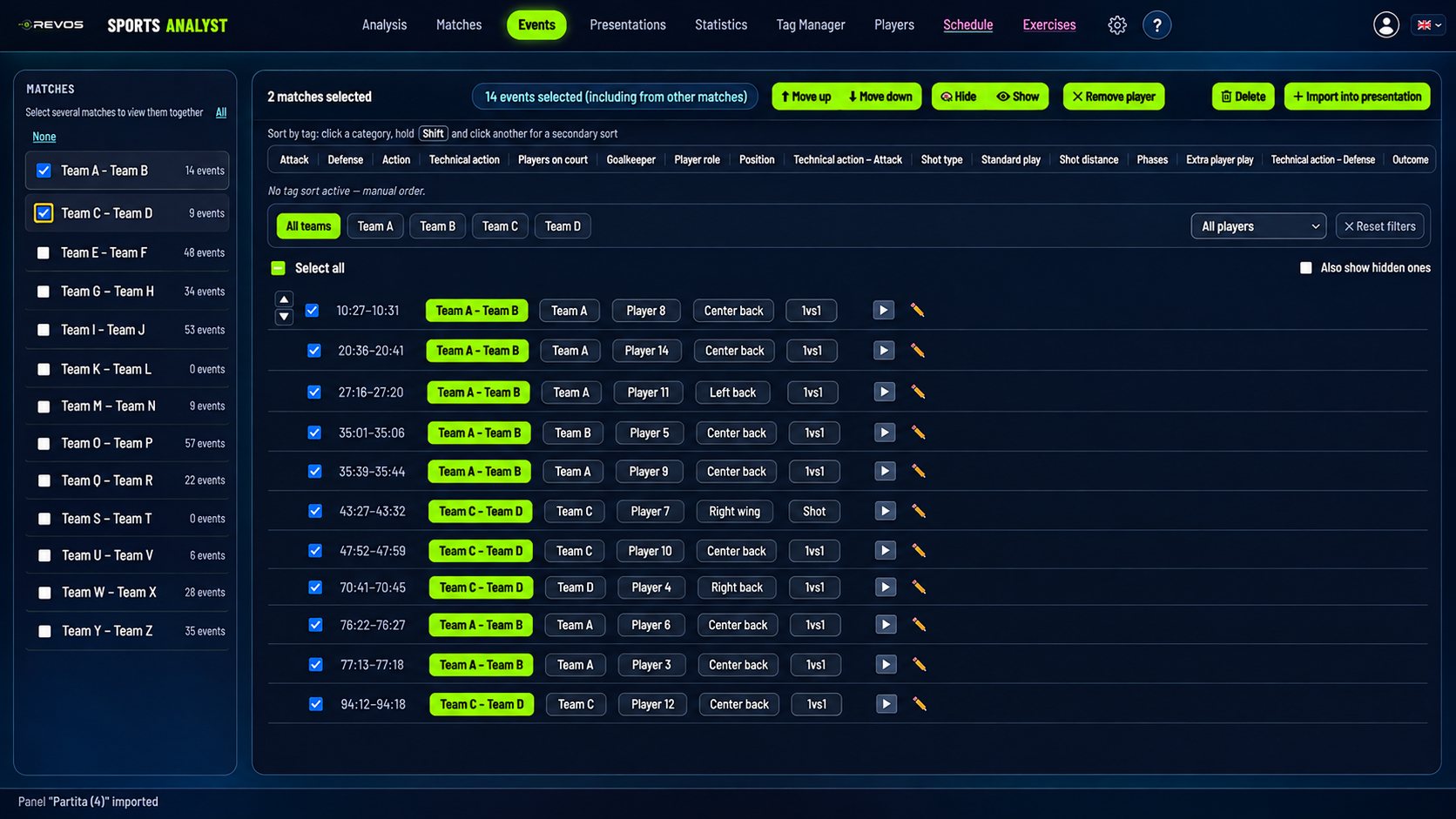
Combine tags and get the matching clips: “7vs6, left back, 9m” or “5:1 defense, steal”. Narrow the search by team, opponent, the last matches, season or text in your notes.
- Select one or several matches and see all their events together
- Filter by team and by player
- Sort by tag: first criterion, then a second one, then by hand
- Send the clips you want to a presentation with one click
Turn clips into a video your team understands
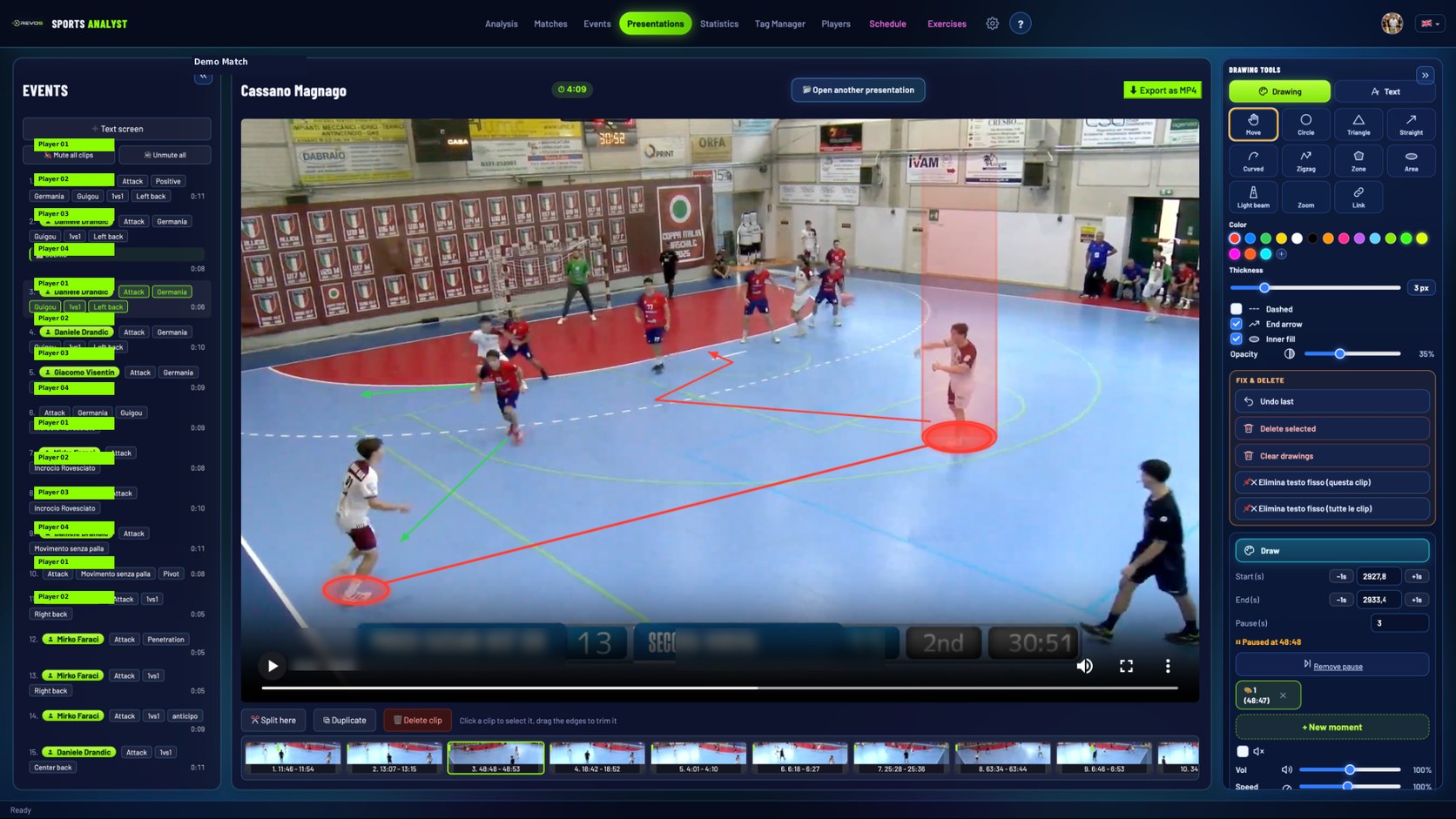
Collect clips in a presentation, trim their start and end, change the speed, add voice-over and text screens.
- Freeze the frame and draw on the video: circles, straight, curved and zigzag arrows, zones, areas, text
- Light beam on a player, zoom, and lines linking players
- Export everything as a single MP4, with the drawings animated
Send video to your players and staff
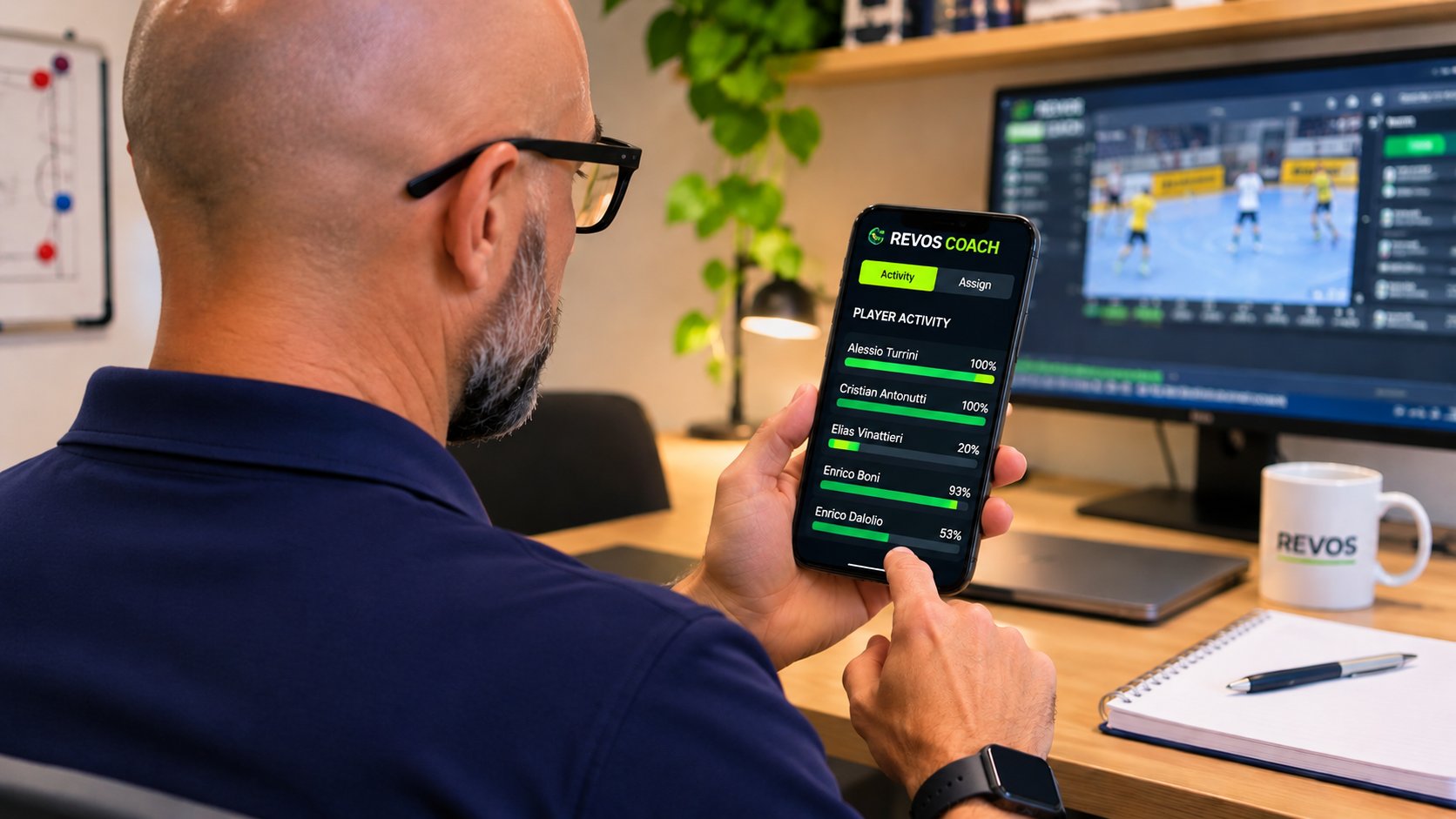
Send a presentation to your players and staff through REVOS Player. Mark it important, schedule when it goes out, and choose whether they can download it. Videos stay available for 20 days. You can also share a light version on Telegram or WhatsApp.
Handball scouting reports your staff will actually use
Create an analysis for an opponent, a scouting trip or one of your own matches. The report starts from ready-made sections that you can rename and reorder:
Add text, statistics, images and linked clips (they stay linked to the video, they are not duplicated), and export an A4 PDF with a cover page and page numbers.
Statistics calculated from the tags you enter
REVOS does not recognize actions automatically. The statistics are built from the tags you assign while you analyze the match, so they reflect your criteria and your definitions.
Choose the tags you care about and REVOS shows, for each one, how many actions carry it and in what percentage of those actions a positive-outcome tag is also present. Use it per match, for a team, or for a single player across all their matches. Compare two matches or two players side by side, and export the table to PDF or Excel.
Example: tag your shots with distance and outcome, and see how many of your 9m shots ended in a goal.
The result is only as accurate as the tagging. REVOS recognizes a positive outcome from tags named Goal or Positive (and their equivalents in the app’s languages), in any category. Tags with other names, such as “No Goal”, are not counted. If you rename tags, use a name of this kind for positive outcomes.
Plan your training, matches and meetings
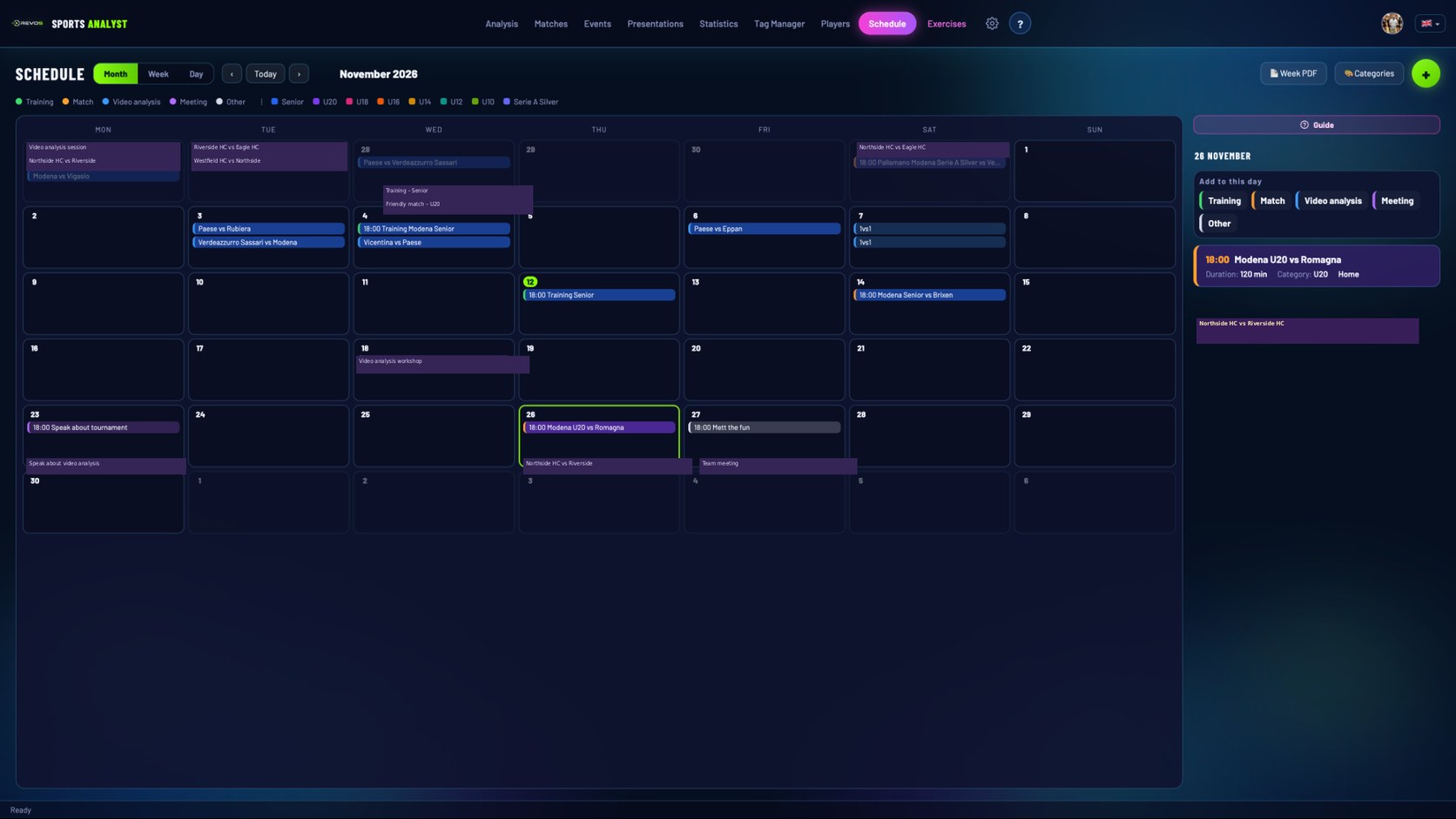
One calendar for training sessions, matches, video analysis and team meetings, with categories and colors. Each session has an objective, load, duration and its list of exercises.
- Squad call-ups (16 players + 2 reserves) with match time and meeting point, as a PDF to share
Draw and organize your exercises
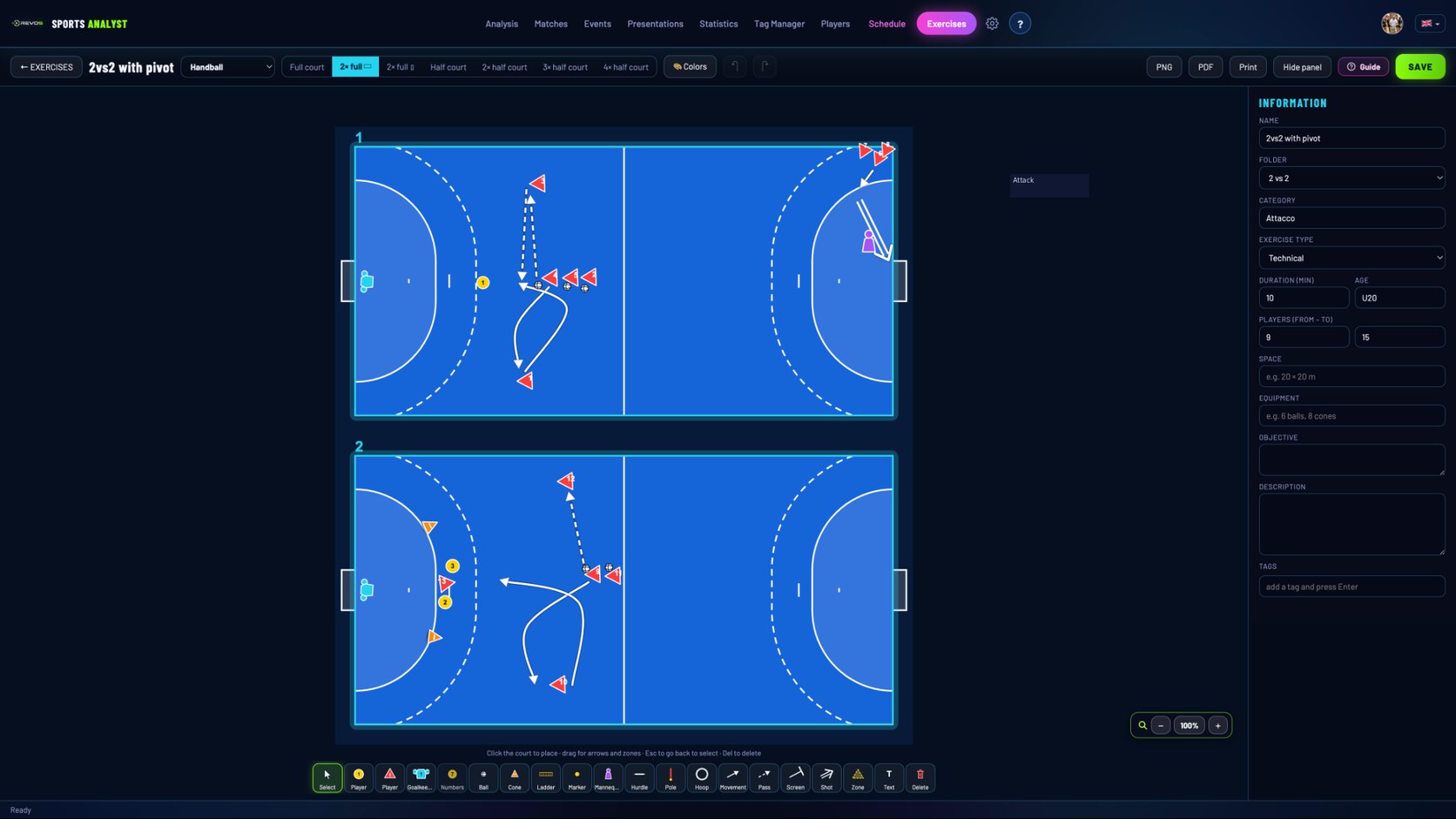
Draw tactical exercises on the court, keep them in a library and add them to your training sessions.
- Tactical board with the handball court (and beach handball): full court, half court, two, three or four half courts
- Players, goalkeeper, ball, cones, ladders, hurdles, poles; arrows, zones, text and numbering
- Exercise library with folders: Warm-up, Individual technique, Passing, Shooting, 1 vs 1, 2 vs 2, Attack, Defense, Transition, Goalkeepers, Superiority, Inferiority
- Export exercises as PNG or PDF, or print the sheet
Handball match analysis: tag the game as you watch it
Press N when an action starts and M when it ends. The video pauses, you click the tags, press Enter, and the action is saved as a clip with its start and end.
- Combine as many tags as you need on a single action: system, shot type, distance, outcome.
- Assign the action to a player from your roster and add a note.
- Choose which team the action refers to, and it stays selected for the next one.
- Jump back 5 seconds with ← and forward with →; replay the last 5, 10 or 15 seconds in slow motion.
- Take a screenshot of any frame and save it as a taggable event.
- Open a video from your computer or paste a YouTube link.
Goalkeeper analysis: tag, search, train
Tag
The panel has a Goalkeeper category (Positive, Negative, Wall collaboration) and Goalkeeper among the player roles, together with shot type, distance and outcome.
Search
Combine goalkeeper tags with shot distance or shot type and get the matching clips, ready to review with the goalkeeper or send to them. Create an individual analysis for a single player or goalkeeper.
Prepare
Build goalkeeper drills on the tactical board and keep them in a dedicated Goalkeepers folder.
Goalkeeper statistics follow the same rule as all the others: they come from the tags you enter.
Try REVOS free for 30 days
Install REVOS, open a match and start tagging. Use every feature on your own matches and decide afterwards.
Available for Windows, macOS and Linux. Updates arrive on their own with every new version. Sign in with your account: your data syncs between your computers (one active computer at a time).
One subscription. All features.
- Video analysis and tagging
- Clips and presentations
- PDF reports
- Statistics and comparison
- Drill editor and planning
- Video delivery to players
- Handball and every team sport, eight languages
- Mac · Windows · Linux
- Updates included
Installing REVOS on Linux
Linux is supported and currently in testing. Installation instructions will be added once verified on a real Linux machine.
Handball video analysis: questions
Does REVOS recognize handball actions automatically?
No. You tag the actions while you watch the video, using the handball tag panel or your own. All statistics are calculated from the tags you enter.
Can I change the tags?
Yes. Rename, reorder, recolor, add, merge or delete tags and categories, create several panels and export them to share with your staff.
Can I analyze goalkeepers?
Yes. Tag goalkeeper actions, search the matching clips, build reports and prepare goalkeeper drills. Results come from your tags, not from automatic detection.
How do I scout a handball opponent with REVOS?
Create an analysis for the opponent, watch their matches and tag their defense system, shot types and key players. Then use the ready-made scouting sections, link the best clips and export a PDF report for your staff. Everything comes from the tags you enter.
Does it work for beach handball?
REVOS includes a beach handball positions panel and a beach handball court in the exercise board. The tag panel described on this page is for indoor handball, and you can adapt it to your needs.
Do I need to upload my videos?
No. REVOS opens a video from your computer without copying it, or downloads one from a YouTube link. Presentations are exported or shared only when you decide.
How much does it cost?
The first 30 days are free. After that the license costs €169 per year.
Can I use REVOS on more than one computer?
Yes, you can install REVOS on several computers (Windows, macOS or Linux) and sign in with your account: your data syncs between them. You can use it on one device at a time.
REVOS is for handball, and for every team sport. See the sports video analysis software for team sports overview.